How to Use Stager Go
Stager Go offers two ways to create stunning virtual staging. Most users love Template Composer — it's fast, guided, and produces professional results in 4 clicks. Advanced users can use Prompt Composer for full creative control.
Template Composer
For most users
Guided workflow with pre-built style presets. Pick a mode, upload a photo, select a style, and generate. Perfect for realtors, photographers, and anyone who wants fast, consistent results.
- 10+ style presets (Modern, Coastal, Farmhouse...)
- 7 modes: Staging, Enhancement, Renovation, Day-to-Dusk...
- Reference image upload for custom looks
Prompt Composer
For advanced users
Full creative control for power users. Write detailed prompts, choose AI models, and fine-tune every aspect. Ideal for designers with specific brand requirements or unique creative visions.
- Write custom prompts with full control
- Choose from multiple AI models
- Upload multiple reference images
Using Template Composer
The fastest way to stage rooms. Follow these 4 simple steps to transform any empty space into a beautifully staged listing.
Choose Mode & Property Type
Select what you want to do. Template Composer offers 7 modes:
Then pick the property type (Residential, Commercial, or Luxury) to help the AI match the right style.
Drag & drop your photo here
JPG, PNG up to 4096px
Upload Your Photo
Drag and drop your room photo or click to browse. Stager Go accepts any quality — our AI enhances it automatically.
Tip: For best results, use wide-angle shots. Fix lighting issues first with Photo Enhancement mode.
Select Room Type & Style
Pick the room type and choose from 10+ built-in style presets:
Pro tip: Upload a Pinterest or reference image if you want a specific look the presets don't cover.
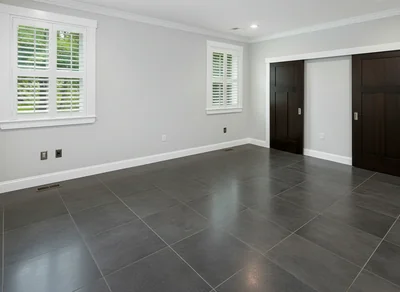
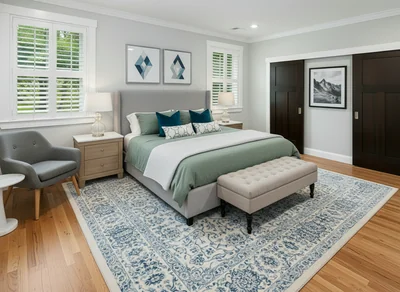
Result in ~30 seconds
Generate & Download
Click generate and watch the AI work. In about 30 seconds, your staged photo is ready.
- Download in high resolution (no watermarks)
- Regenerate with different settings if needed
- All results saved to your workspace
Try Template Composer Now
Experience how easy it is. Upload a photo or use our sample image.
Tips for Best Results
Get the most out of Template Composer with these pro tips
Use Wide-Angle Photos
Wide shots give the AI more context and produce better furniture placement.
Fix Lighting First
Use Photo Enhancement mode before staging dark or poorly lit photos.
Upload References
Use Pinterest or magazine images as references for exact looks.
Generate Multiple Versions
Create 2-3 variations to give buyers options.
Match the Property
Use Luxury style for high-end listings, Farmhouse for rural properties.
Add Custom Instructions
Use the prompt field to specify details like "no artwork" or "blue accents".
Prompt Composer: Full Creative Control
For designers and power users who need pixel-perfect control. Write custom prompts, choose AI models, and upload multiple references.
Custom Brand Aesthetics
Interior designers matching specific furniture brands or unique client requirements.
Precise Style Control
When presets aren't enough and you need to describe exact colors, materials, or layouts.
Model Selection
Choose specific AI models optimized for speed, quality, or particular visual styles.
Try Prompt Composer — write your own detailed instructions
Who Uses Stager Go?
Real estate professionals trust Stager Go for fast, professional results
Realtors
Use Template Composer to stage vacant listings in minutes with consistent, MLS-ready quality.
Photographers
Offer staging as an upsell. Use Prompt Composer when clients have specific style requirements.
Property Managers
Fill vacancies faster with Template Composer. Affordable at scale with consistent branding.
Frequently Asked Questions
Ready to Start Staging?
Most users are up and running in under 2 minutes with Template Composer
Start Staging Free