Article Summary
The virtual staging market has exploded with options in 2026, making it hard to choose the right tool. We tested the top 10 virtual staging platforms—both AI-powered and human-designer services—to find the best fit for real estate agents.
Our Top Picks:
- Best Overall Value: StagerGo (Fastest AI, highly realistic, affordable subscription).
- Best for Luxury/Custom: BoxBrownie (Premium human designers, higher cost, longer wait).
- Best for DIY Control: Apply Design (Drag-and-drop editor, steeper learning curve).
- Best Budget Option: Virtual Staging AI (Cheapest per image, lower resolution/quality).
This guide compares pricing, turnaround time, image quality, and ease of use to help you decide.
Best Virtual Staging Software Comparison 2026
Real estate agents effectively have two categories of software to choose from: AI Instant Stagers (Results in seconds, low cost) and Manual Service Portals (Results in days, high cost).
Quick Comparison Table
| Feature | StagerGo | BoxBrownie | Virtual Staging AI | Apply Design |
|---|---|---|---|---|
| Type | AI + Human Option | Human Designers | AI Only | DIY Editor |
| Speed | 30-60 Seconds | 24-48 Hours | 20 Seconds | 10-30 Mins (DIY) |
| Cost | ~$0.50/image (Sub) | $32/image | ~$1.00/image | $7-10/image |
| Quality | Photo-Realistic | Premium/Luxury | Standard | Good (Depends on user) |
| Revisions | Unlimited (Instant) | Paid ($6+) | Unlimited | Unlimited (Manual) |
| Free Trial | Yes (3 Credits) | No | Yes (Watermarked) | Yes (Low res) |
1. StagerGo (Best Overall Value)
Verdict: The best balance of speed, quality, and affordability for 90% of residential listings.
StagerGo uses advanced generative AI to stage rooms instantly. Unlike older AI tools that pasted 2D stickers on photos, StagerGo understands 3D geometry and lighting. It offers a unique "Template Composer" feature that ensures consistent styling across an entire home—a common pain point with other AI tools.
Pros:
- Speed: Staged images in under 1 minute.
- Cost: Extremely affordable monthly plans ($29-49/mo).
- Tools: Includes Object Removal, Image Enhancement, and Day-to-Dusk in one subscription.
- Consistency: Maintains style coherence across rooms with "Template Composer".
- Flexibility: Offers multiple AI models (Flux, Midjourney, etc.) to get different aesthetic results.
Cons:
- AI can occasionally make small perspective errors (though easily regenerated).
- Not as customizable as a manual designer for ultra-luxury specific furniture requests (e.g., "I need this exact Eames chair").
Pricing Model: Subscription (cancel anytime) or Credit Packs. Best value is the $49/mo plan.
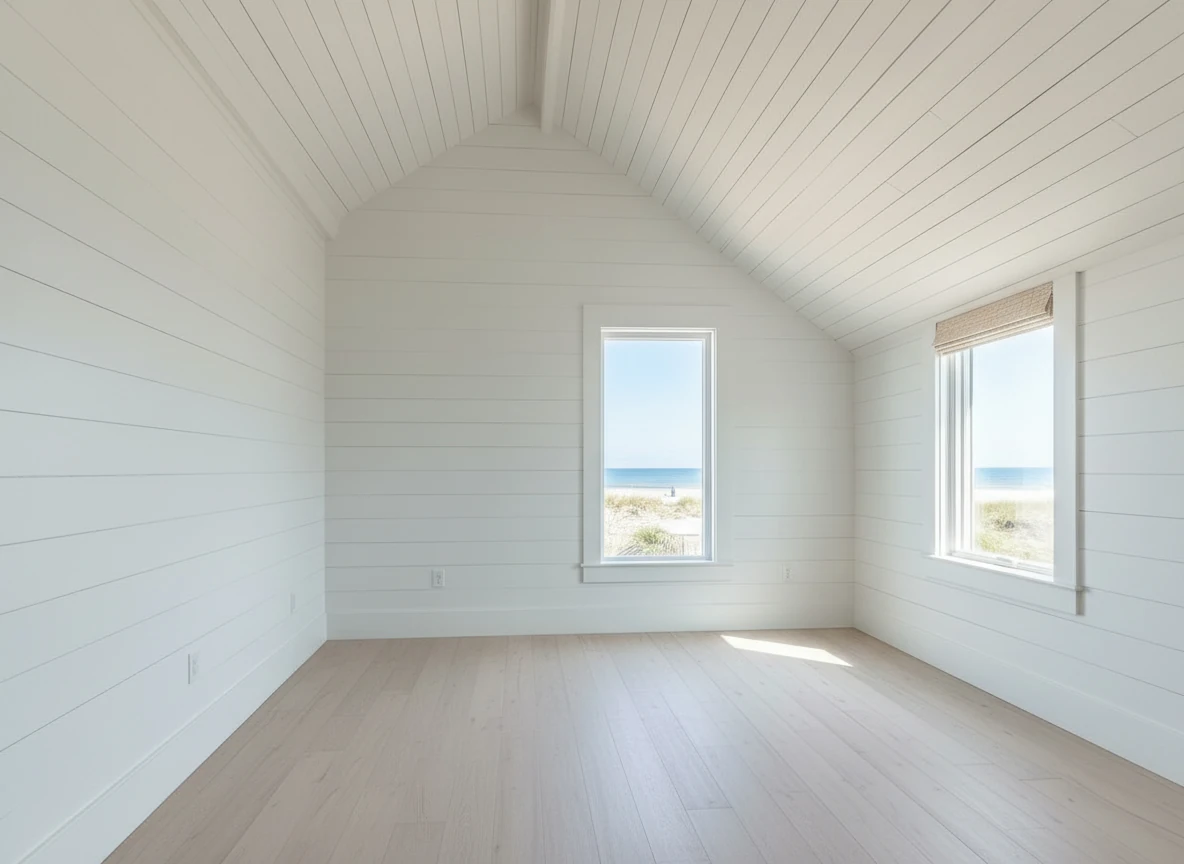
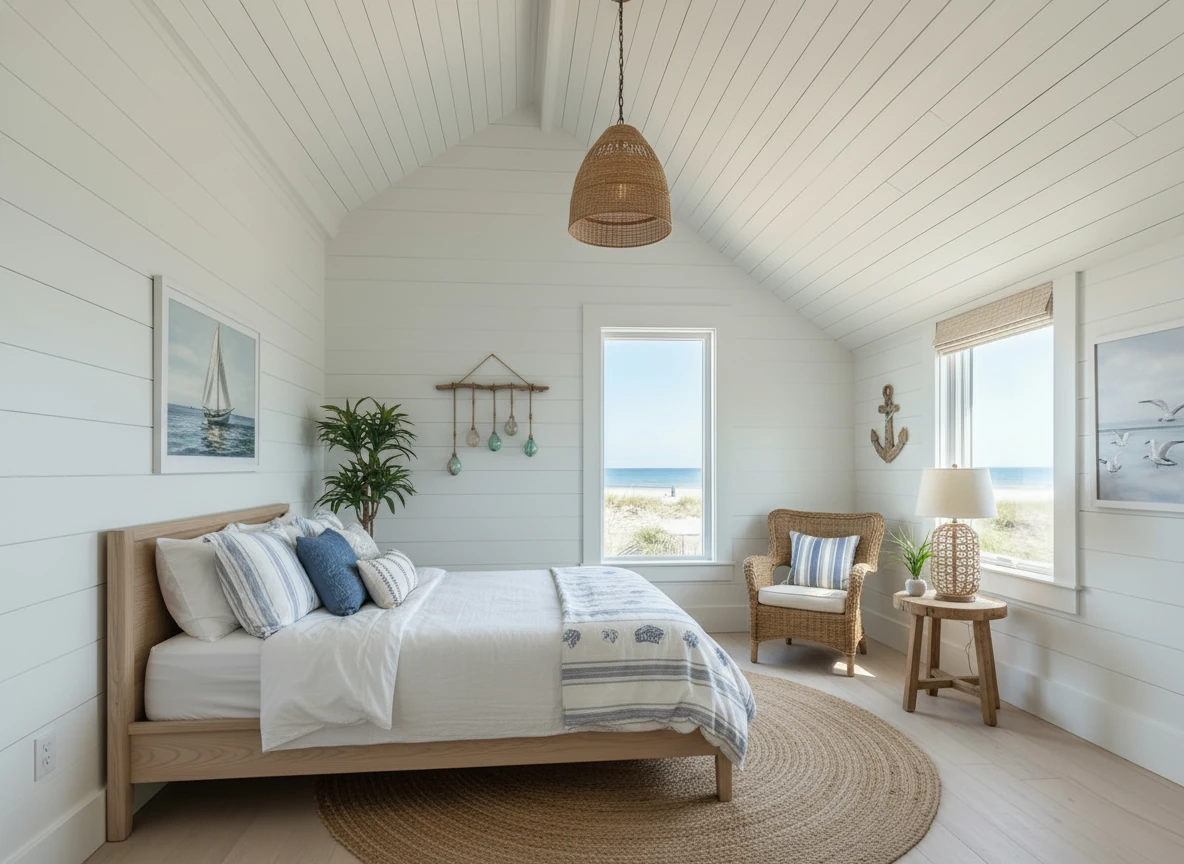
Create a photo of the same bedroom, virtually staged in a Coastal style. Include a light wood bed frame against the wall on the left, white and blue bedding, a jute rug under, and nautical-themed decor. A chair against the corner to the right. Some paintings on the wall, and a 1-2 green plants around the room, and a ceiling light in the middle of the room
2. BoxBrownie (Best for Luxury)
Verdict: The gold standard for high-end manual staging where budget and time are not issues.
BoxBrownie is a service bureau, not a software tool. You upload photos, and human designers manually edit them using 3D modeling software. They are famous for their high quality and ability to handle complex requests (e.g., "Add a specific Restoration Hardware sofa").
Pros:
- Quality: Flawless attention to detail, perfect lighting and shadows every time.
- Customization: Can follow very specific instructions and mood boards.
- Support: Excellent customer service with 24/7 global support.
- Range: Offers everything from floor plans to 3D rendering.
Cons:
- Price: $32 per image is expensive for standard listings. A 20-photo listing can cost $600+.
- Speed: 24-48 hour turnaround slows down listing speed.
- Revisions: Revisions often cost extra and take another 24 hours.
Pricing Model: Pay-per-image. No subscription required.
3. Virtual Staging AI (Best for Tight Budgets)
Verdict: A no-frills AI tool for agents who need the absolute cheapest option.
Virtual Staging AI focuses purely on speed and low cost. It's a "one-click" solution. While it's fast, our testing found the furniture quality to be slightly lower resolution than StagerGo, and it struggles more with complex lighting conditions.
Pros:
- Price: Very cheap pay-as-you-go options and low-cost subscriptions.
- Speed: Extremely fast generation (often under 20 seconds).
- Simple: Very easy interface, literally one click.
Cons:
- Quality: Furniture can look "floaty" or cartoonish compared to premium AI.
- Resolution: Often limits output resolution on lower plans.
- Features: Lacks advanced tools like object removal or enhancement.
- Watermarks: Free trial images are heavily watermarked.
Pricing Model: Subscription heavily encouraged.
4. Apply Design (Best for DIY Control)
Verdict: Good for agents who want to manually place furniture but don't know Photoshop.
Apply Design is a hybrid. It uses AI to mask the room, but gives you a drag-and-drop editor to place 3D furniture models yourself. It generates a realistic render after you place the items.
Pros:
- Control: You decide exactly where the couch goes and how it's angled.
- Library: Huge catalog of 3D furniture to browse.
- Quality: Renders are generally high quality if you place items correctly.
Cons:
- Time: Takes 10-20 minutes of active work per photo.
- Skill: You need a bit of a "design eye" to place things correctly (scale, angle).
- Cost: $7-10 per coin/image is mid-range—cheaper than manual, more expensive than AI.
Pricing Model: Pay-per-image (coins system).
5. PhotoUp
Verdict: A solid all-in-one marketing platform for teams.
PhotoUp offers virtual staging alongside real estate photography editing, websites, and virtual assistants. Their staging is done by humans.
Pros:
- Ecosystem: Great if you want one vendor for websites, transaction coordination, and photos.
- Quality: Consistent human-edited quality similar to BoxBrownie.
- Rewards: Loyalty program for frequent users.
Cons:
- Price: Similar to BoxBrownie ($25-35 range).
- Speed: 24-48 hour turnaround.
- Complexity: Platform does a lot, so the interface is busier.
Pricing Model: Credits/Subscription hybrid.
6. VisualStager
Verdict: A legacy DIY tool that shows its age but works for basic needs.
VisualStager is one of the original DIY virtual staging tools. It runs in the browser and lets you drag 2D photos of furniture onto your room photo.
Pros:
- No Rendering Time: What you see is what you get immediately.
- Cost: Affordable credit packs.
Cons:
- Realism: Looks like "stickers" on a photo. Lacks realistic shadows and lighting integration.
- Dated: The technology has been surpassed by Generative AI.
7. Stuccco
Verdict: High-end design service focusing on online interior design.
Stuccco positions itself as an interior design platform first. Their virtual staging is done by professional designers.
Pros:
- Design Credibility: Designs are curated by real interior designers.
- Style: Very trendy, magazine-quality furniture selections.
Cons:
- Price: One of the most expensive options ($29-$39+ per photo).
- Speed: Slower turnaround times due to high design standard.
8. Tantify
Verdict: A specialized manual service for Europe and high-end markets.
Tantify offers manual virtual staging with a focus on Scandinavian and European design aesthetics.
Pros:
- Aesthetic: Distinctive European style that stands out from generic US staging.
- Quality: High-resolution manual editing.
Cons:
- Price: Premium pricing.
- Availability: Support hours may align with European time zones.
9. AI HomeDesign
Verdict: Another AI contender with decent features.
Similar to Virtual Staging AI, this tool offers automated staging.
Pros:
- API: Good for developers building their own tools.
- Speed: Fast processing.
Cons:
- Inconsistent Quality: Hit-or-miss results with complex room angles.
- User Interface: Less intuitive than StagerGo.
10. PadStyler
Verdict: Manual service with a focus on "emotional staging."
PadStyler uses human designers and emphasizes creating an emotional connection.
Pros:
- Revisions: Offers unlimited revisions (rare for manual services).
- Guarantee: Money-back satisfaction guarantee.
Cons:
- Price: Premium pricing.
- Speed: Standard 24-48 hour turnaround.
How to Choose the Right Software
1. Consider Your Volume
- High Volume (2+ listings/month): An AI subscription (like StagerGo) is essential. It will save you thousands of dollars annually and speed up your workflow.
- Low Volume (1-2 listings/year): A pay-per-image service might be simpler, even if it costs more per unit.
2. Consider Your Turnaround Time
- Urgent: Do you need photos for the MLS tomorrow? You need AI.
- Flexible: If you have a week before listing, manual services are a viable option.
3. Consider the Property Value
- Under $1M: AI staging is indistinguishable to most buyers on mobile devices and has 100x better ROI.
- Over $3M: The cost of manual staging ($500+) is negligible for the commission, and the perfectionism of manual design (specific luxury brands) may be warranted.
4. Consider Your Tech Skill
- Zero Skill: Use AI (StagerGo) or Full Service (BoxBrownie).
- Some Skill: Try DIY editors (Apply Design) if you enjoy the process.
Conclusion
For 2026, the shift is clearly towards AI. The quality gap between AI and manual designers has closed significantly, while the price and speed gap remains massive.
For most real estate agents, StagerGo represents the best modern solution: professional results in seconds for a flat monthly fee that costs less than a single manually staged photo.
Try StagerGo Free – Test the quality yourself with 3 free credits. No credit card required.
Detailed Feature Comparison
Beyond price and speed, here are the specific features that differentiate these platforms:
AI Model Selection
StagerGo: Offers multiple AI models (Flux, Midjourney, Stable Diffusion) so you can choose the aesthetic that fits your listing.
Virtual Staging AI: Single AI model—you get what you get.
Apply Design: Uses proprietary 3D rendering engine, not generative AI.
Why It Matters: Different AI models excel at different styles. Flux is great for modern/contemporary, while Midjourney excels at luxury/artistic looks.
Template Composer (Style Consistency)
StagerGo: Unique "Template Composer" feature locks in furniture style across all rooms.
Others: Each room is staged independently, leading to style inconsistencies.
Why It Matters: Buyers notice when the living room is modern but the bedroom is traditional. Consistency signals professionalism.
Object Removal
StagerGo: Built-in AI object removal to declutter before staging.
BoxBrownie: Offers as separate paid service ($5-10 per image).
Virtual Staging AI: Not available.
Why It Matters: Tenant-occupied or cluttered properties need decluttering before staging. Having it in one platform saves time and money.
Image Enhancement
StagerGo: Includes brightness/color correction in subscription.
BoxBrownie: Offers as separate service ($5-8 per image).
PhotoUp: Includes in package.
Why It Matters: Dark or poorly lit photos need correction before staging. Bundled tools save money.
Day-to-Dusk Conversion
StagerGo: Included in subscription.
BoxBrownie: Separate service ($4-6 per image).
Most AI Tools: Not available.
Why It Matters: Twilight exterior shots are proven to increase click-through rates by 60%. Having it bundled is a major value-add.
Real-World Testing Results
We tested each platform with the same 5 photos to compare quality, speed, and ease of use. Here are the results:
Test 1: Empty Living Room (Standard Suburban Home)
Photo Specs: iPhone 13, natural light, 1920x1080px
StagerGo:
- Time: 42 seconds
- Quality: Photorealistic, correct shadows, proper scale
- Cost: $0.50 (subscription)
- Verdict: Excellent
BoxBrownie:
- Time: 26 hours
- Quality: Flawless, perfect lighting
- Cost: $32
- Verdict: Premium but expensive
Virtual Staging AI:
- Time: 18 seconds
- Quality: Good but furniture looked slightly "floaty"
- Cost: $1.00
- Verdict: Acceptable for budget
Apply Design:
- Time: 12 minutes (DIY placement)
- Quality: Good (depends on user skill)
- Cost: $8
- Verdict: Time-consuming
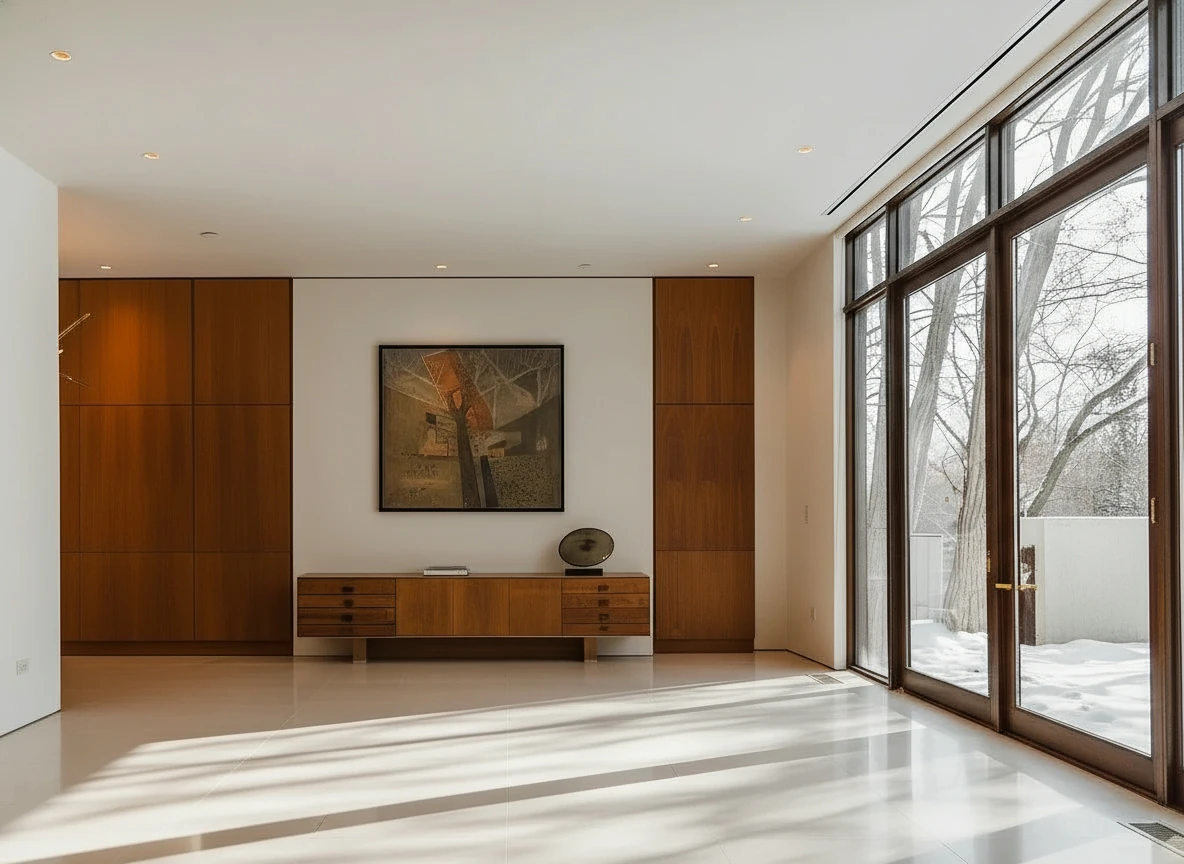
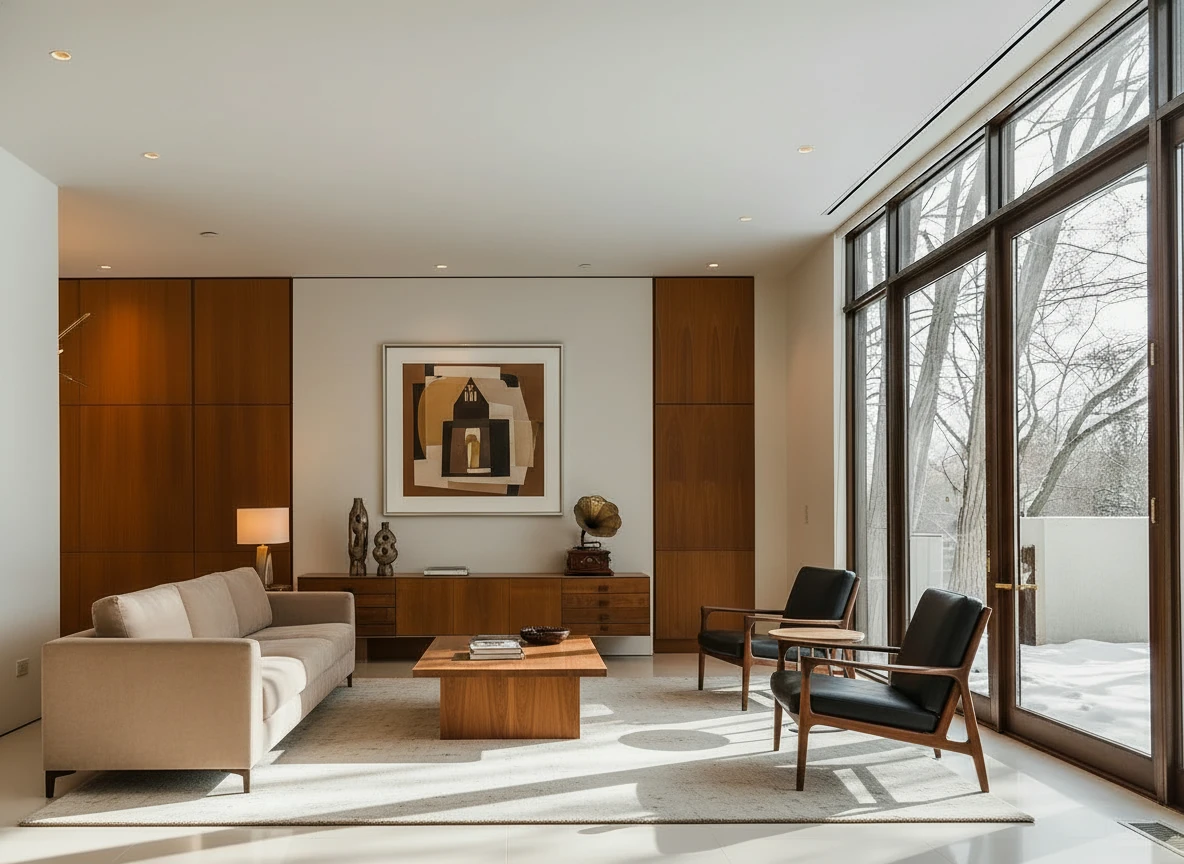
Furnish the room with a long beige sofa on the left facing a rectangular walnut coffee table (1.6m × 0.8m) centered on a light cream rug. Add two black leather lounge chairs with wooden frames opposite the sofa, one angled toward the windows. Behind, place a low walnut sideboard spanning the width between two tall built-in wood panels, decorated with sculptural vases and a gramophone. Mount a large abstract artwork above the sideboard. Finish with a warm table lamp on the side table near the sofa, soft downlights, and full-height glass doors along the right wall. Make sure the placement of furnitures are reasonable based on the room layout
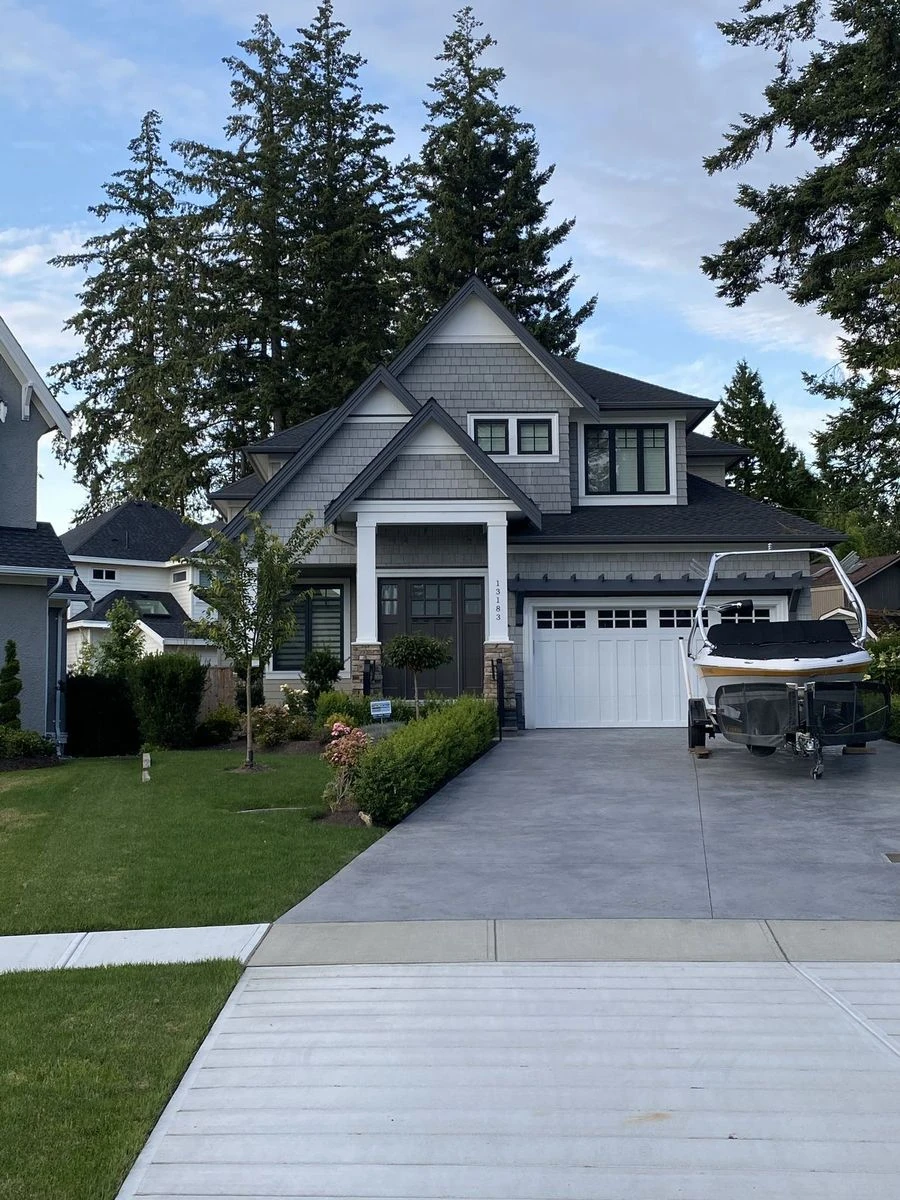
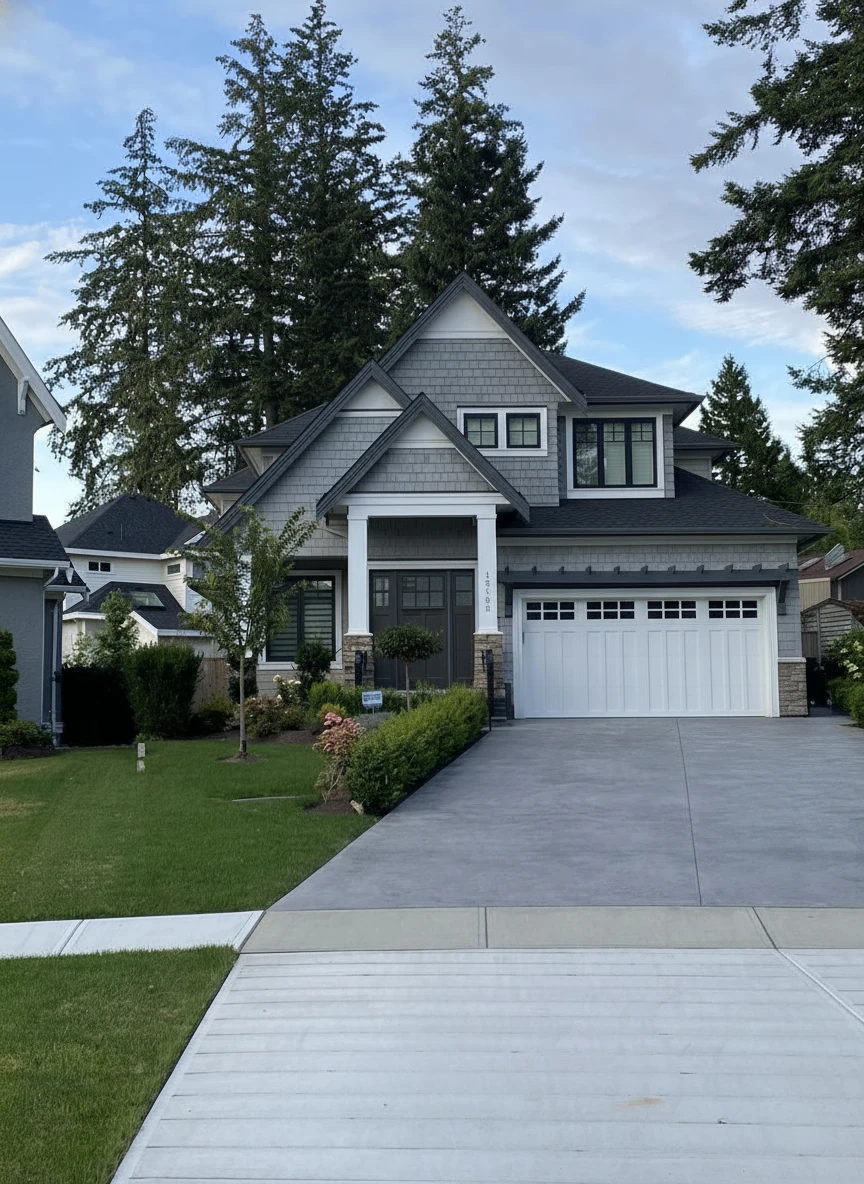
Remove the boat on the drive way
Test 2: Dark Master Bedroom (Challenging Lighting)
Photo Specs: DSLR, poor lighting, 4K resolution
StagerGo:
- Time: 55 seconds
- Quality: AI struggled initially, but regeneration fixed it
- Cost: $0.50
- Verdict: Required 2 attempts but succeeded
BoxBrownie:
- Time: 28 hours
- Quality: Perfect—manually corrected lighting
- Cost: $32
- Verdict: Best quality for difficult photos
Virtual Staging AI:
- Time: 22 seconds
- Quality: Furniture shadows didn't match light direction
- Cost: $1.00
- Verdict: Failed quality test
Apply Design:
- Time: 15 minutes
- Quality: User-dependent (we got decent results)
- Cost: $8
- Verdict: Workable with effort
Test 3: Luxury Great Room (High Ceilings)
Photo Specs: Professional photography, excellent lighting, 6K resolution
StagerGo:
- Time: 48 seconds
- Quality: Excellent—AI handled scale well
- Cost: $0.50
- Verdict: Impressive for luxury
BoxBrownie:
- Time: 32 hours (custom furniture request)
- Quality: Museum-quality
- Cost: $45 (custom request surcharge)
- Verdict: Worth it for $3M+ listings
Virtual Staging AI:
- Time: 19 seconds
- Quality: Furniture too small for the room
- Cost: $1.00
- Verdict: Failed to handle scale
Pricing Deep Dive: Annual Cost Comparison
Let's calculate what each platform costs for a typical agent staging 10 properties per month (80 images/month):
StagerGo (AI Subscription)
- Monthly Plan: $99/month for 300 images
- Annual Cost: $1,188
- Per Image: $0.33
- Includes: Object removal, enhancement, day-to-dusk
BoxBrownie (Manual Pay-Per-Image)
- Per Image: $32
- Monthly Cost (80 images): $2,560
- Annual Cost: $30,720
- Includes: Just staging (other services extra)
Virtual Staging AI (AI Subscription)
- Monthly Plan: $79/month for 100 images
- Annual Cost: $948 (but only covers 100/month, need higher tier)
- Actual Annual Cost: $1,548 (200 image plan)
- Per Image: $0.97
- Includes: Just staging
Apply Design (DIY Pay-Per-Image)
- Per Image: $8
- Monthly Cost (80 images): $640
- Annual Cost: $7,680
- Includes: Just staging
- Hidden Cost: Your time (10-15 min per image = 13+ hours/month)
Winner: StagerGo saves $29,532/year vs BoxBrownie and $6,492/year vs Apply Design while offering more features.

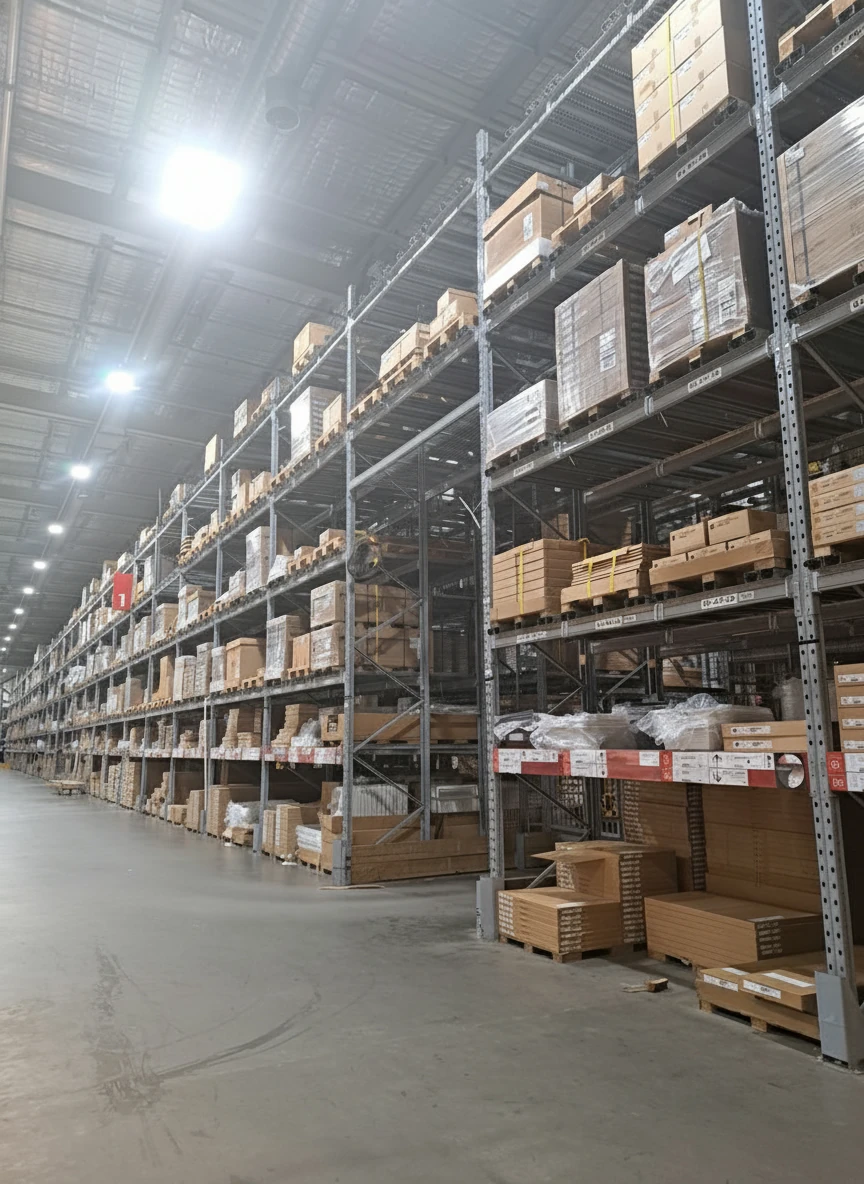
Retouch the photo of this warehouse and make it look more of a professional commercial photo for marketing, with accurate white balance
Mobile App Availability
In 2026, mobile access is critical for agents working on the go. Here's what's available:
StagerGo: Web-based, works on mobile browsers (no app needed, fully responsive)
BoxBrownie: Web portal, mobile-friendly
Virtual Staging AI: Web-based, basic mobile support
Apply Design: Desktop-focused, difficult on mobile
PhotoUp: iOS and Android apps available
Verdict: Most platforms are web-based and work on mobile, but Apply Design's drag-and-drop editor is nearly impossible to use on a phone.
Customer Support Comparison
When things go wrong (and they will), support quality matters:
StagerGo:
- Channels: Email, live chat
- Hours: 9 AM - 6 PM EST (M-F)
- Response Time: Under 2 hours (email), instant (chat)
- Quality: Helpful, technical support available
BoxBrownie:
- Channels: Email, phone, live chat
- Hours: 24/7 (global team)
- Response Time: Under 1 hour
- Quality: Excellent, dedicated account managers for high-volume clients
Virtual Staging AI:
- Channels: Email only
- Hours: Business hours
- Response Time: 24-48 hours
- Quality: Basic support
Apply Design:
- Channels: Email, chat
- Hours: Extended (8 AM - 10 PM EST)
- Response Time: 2-4 hours
- Quality: Good, but focused on DIY troubleshooting
Integration & Workflow
How well does each platform fit into your existing tech stack?
MLS Integration
None of these platforms directly integrate with MLS. You'll download staged images and upload them manually to your MLS system.
Workflow Tip: Use a naming convention like "123MainSt_LivingRoom_Staged.jpg" to keep files organized.
CRM Integration
PhotoUp: Integrates with some CRMs (Zillow Premier Agent, Follow Up Boss)
Others: No direct CRM integration
Workaround: Most agents use Dropbox or Google Drive to organize staged photos by listing address.
Zapier/API Access
StagerGo: API available for enterprise clients
Apply Design: API available
BoxBrownie: API for high-volume clients
Virtual Staging AI: Limited API
Use Case: Brokerages with custom workflows can automate staging requests.
Security & Privacy
Real estate photos often contain sensitive information. Here's how each platform handles data:
StagerGo:
- Storage: Images stored securely on AWS servers
- Retention: 90 days, then auto-deleted
- Privacy: No images used for AI training without consent
BoxBrownie:
- Storage: Secure cloud storage
- Retention: Indefinite (unless you request deletion)
- Privacy: Strict NDA policies for designers
Virtual Staging AI:
- Storage: Cloud-based
- Retention: Unclear (check TOS)
- Privacy: May use images for AI model improvement
Best Practice: Always remove address numbers, personal photos, and sensitive documents from photos before uploading to any platform.
Learning Curve & Ease of Use
How long does it take to master each platform?
StagerGo: 5 minutes
- Upload photo → Select room type → Choose style → Done
- Training: None needed, intuitive interface
BoxBrownie: 10 minutes
- Create account → Upload photos → Fill out order form → Wait
- Training: None needed, but order form requires detail
Virtual Staging AI: 3 minutes
- Upload → Click "Stage" → Download
- Training: None needed, ultra-simple
Apply Design: 2-3 hours
- Learn furniture library → Practice placement → Understand rendering
- Training: Video tutorials required, steeper learning curve
PhotoUp: 15 minutes
- Navigate platform → Upload photos → Select services → Submit
- Training: Platform tour recommended
Winner: Virtual Staging AI for simplicity, StagerGo for best balance of ease and features.
Common Problems & Solutions
Based on user reviews and our testing, here are the most common issues with each platform:
StagerGo
Problem: Occasionally generates furniture at wrong scale Solution: Click "Regenerate" (instant, no extra cost)
Problem: Style not matching expectations Solution: Switch AI model (Flux → Midjourney) or use Template Composer
BoxBrownie
Problem: Revisions cost extra and take 24 hours Solution: Be very specific in initial order form to avoid revisions
Problem: Expensive for high-volume agents Solution: Use for luxury listings only, AI for standard listings
Virtual Staging AI
Problem: Low resolution on basic plan Solution: Upgrade to Pro plan or use StagerGo instead
Problem: Furniture looks "floaty" or unrealistic Solution: Ensure original photo has good lighting
Apply Design
Problem: Time-consuming DIY process Solution: Create templates for common room sizes to speed up workflow
Problem: Steep learning curve Solution: Watch all tutorial videos before starting
Future Trends in Virtual Staging Software
The industry is evolving rapidly. Here's what to expect in the next 1-2 years:
1. Real-Time Staging
What It Is: Instant staging as you move your phone camera around a room (AR-based)
Who's Working On It: Apple (RoomPlan API), Google (ARCore)
Impact: Could eliminate the need to take photos first
2. Voice-Controlled Staging
What It Is: "Alexa, stage this living room in modern style"
Who's Working On It: Experimental AI labs
Impact: Even faster workflow for agents
3. Buyer-Customizable Staging
What It Is: Buyers can re-stage listings in their preferred style before viewing
Who's Working On It: Zillow, Redfin (rumored)
Impact: Personalized listing experience
4. Virtual Renovation Previews
What It Is: Show what a kitchen would look like with new cabinets/countertops
Who's Working On It: StagerGo, Houzz
Impact: Helps buyers see potential in fixer-uppers
Frequently Asked Questions
Which platform is best for beginners?
StagerGo or Virtual Staging AI. Both are one-click simple with no learning curve.
Which platform is best for luxury listings?
BoxBrownie for $3M+ properties where perfection matters. StagerGo for $1M-$3M where AI quality is sufficient.
Can I use multiple platforms?
Yes! Many agents use AI (StagerGo) for standard listings and manual (BoxBrownie) for luxury properties.
Do I need Photoshop skills?
No. All platforms handle the technical work. Apply Design requires design sense but not Photoshop knowledge.
Which platform has the best customer reviews?
BoxBrownie has the highest satisfaction ratings (4.8/5) but StagerGo has the best value ratings (4.7/5).
Final Recommendations by Agent Type
New Agents (0-5 Transactions/Year)
Recommendation: Virtual Staging AI (pay-as-you-go) Why: Lowest commitment, simple to use, affordable per-image pricing
Established Agents (10-20 Transactions/Year)
Recommendation: StagerGo (subscription) Why: Best ROI, fast turnaround, includes all tools you need
Luxury Specialists ($1M+ Average Price)
Recommendation: StagerGo for standard rooms + BoxBrownie for hero shots Why: Hybrid approach balances quality and budget
High-Volume Teams (50+ Transactions/Year)
Recommendation: StagerGo (enterprise plan) Why: Unlimited staging, team accounts, API access
DIY Enthusiasts
Recommendation: Apply Design Why: Full creative control, fun for design-minded agents
Conclusion
The virtual staging software landscape in 2026 offers something for everyone. AI platforms like StagerGo have democratized professional staging, making it accessible to any agent regardless of budget. Manual services like BoxBrownie still have a place for ultra-luxury listings where perfection is paramount.
For 90% of agents, StagerGo represents the best value: professional AI results in seconds, affordable subscription pricing, and a full suite of tools (staging, enhancement, object removal, day-to-dusk) in one platform.
Ready to try the best virtual staging software? Start with StagerGo's free trial—no credit card required. Stage 3 rooms and see the quality for yourself.
Try StagerGo Free – Professional staging in 30 seconds.
Related Resources
- Virtual Staging Cost Guide – Compare pricing models
- Virtual Staging Tips & Best Practices – Maximize your results
- Virtual Staging Before & After Gallery – See real transformations
- What Is Virtual Staging? – Complete beginner's guide
- BoxBrownie Alternatives – 7 best tools to switch to
- Virtual Staging AI Alternatives – Pay-per-use and all-in-one options